
The EnterpriseOne Session Timeout Two-Step…Ok, Three Step
Read Time:1 Min, 30 Sec
We have several work areas that require a longer inactive timeout setting than the default 20 minutes (Payroll Time-entry, Fixed Asset Accounting, etc.).
Unfortunately, EnterpriseOne?s architecture does not make the process of configuring a session timeout very easy. There are three separate separate settings that need to configured correctly. Depending on your architecture that could mean three separate machines using three separate platforms. Whatever your architecture looks like there are at least three.
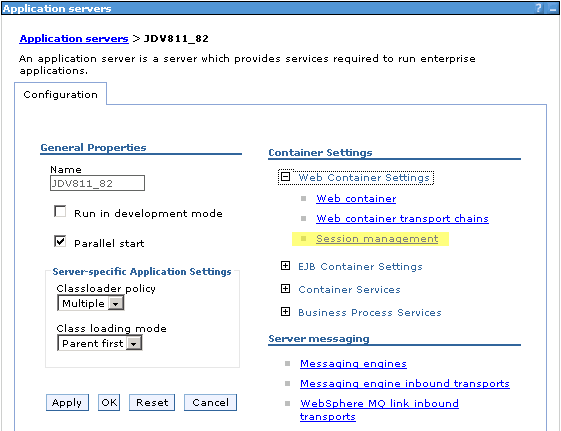
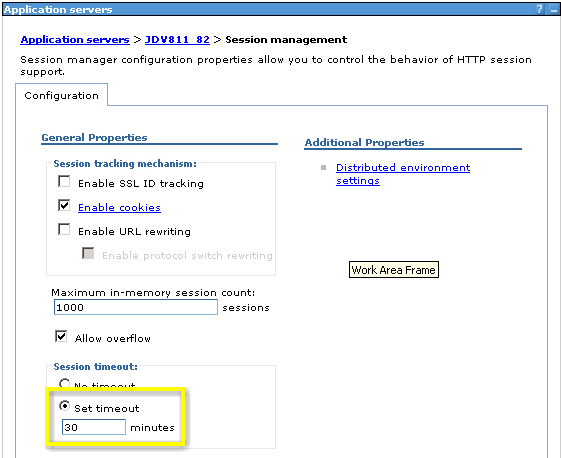
- The Java Application Server (JAS). No matter what flavor of JAS you are running (IBM Websphere, Oracle Application Server, BEA, etc.) you will need to configure the application?s user session timeout setting. The screenshots for IBM Websphere 6.0.2.13 are below:
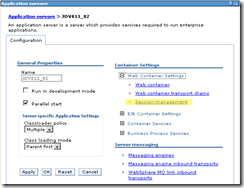
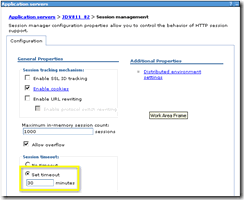
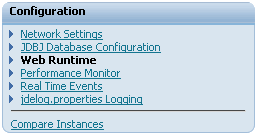
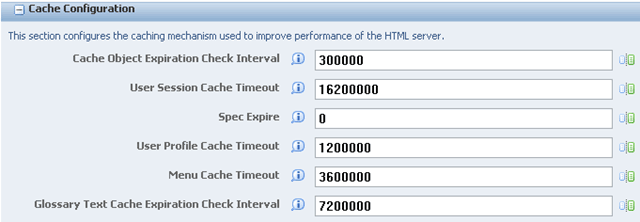
- The EnterpriseOne HTML Server. This setting is in the JAS.INI under the [CACHE] stanza. The setting is in milliseconds (3600000 = 1 hour). If you are running the Oracle Server Manager for EnterpriseOne, you can find it in the ?Cache Configuration section under the ?Web Runtime? configuration.
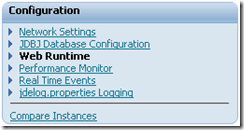
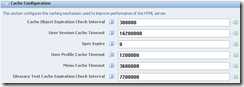
- The HTTP server. The instructions for both Microsoft IIS and IBM HTTP Server follows:
- Microsoft IIS:
- Display the properties of the website that is configured to host EnterpriseOne
- On the ?Website? tab, modify the ?Connection Timeout? setting. Please note that this value is in seconds, not milliseconds.
- IBM HTTP Server:
- Edit the ?Timeout? setting in the HTTPD.CONF file. Please note that this value is in seconds, not milliseconds.
- Microsoft IIS:
NOTE: To avoid record locking Oracle specifies to configure the system so that the JAS server will ?timeout? the user?s session. To do that both the EnterpriseOne HTML Server and the HTTP server need to be set to great times than the JAS server. For example:
- To configure a timeout value of 30 minutes:
- JAS Server: 30
- EnterpriseOne HTML Server: 3600000
- HTTP Server: 3600


Happy
0

Sad
0

Excited
0

Sleepy
0

Angry
0

Surprise
0
Looks to me like you set The JAS Server to 30 Min the other 2 for one hour, just an FYI
Correct, Mike. That way the HTTP Server and the E1 HTML Server do not timeout before the JAS Server does. I guess I kind of over did it by doubling the JAS Server timeout, but it gets the job done. It would be just as good if I had set the E1 HTML Server and HTTP Server to 35 minutes (2100000 & 2100).
Thanks for reading and commenting! I probably should have explained that a little better in the post.